Ellie.ai has introduced a major enhancement to its modeling experience with a brand new Relationship Editor, offering a clearer, faster, and more powerful interface for managing entity connections. This is not just a visual update—it lays the foundation for reusable relationships, a highly anticipated capability. Simultaneously, the Ellie.ai x Collibra integration has taken a significant leap forward. While the initial integration focused on Glossary and Conceptual Model synchronization, it now extends to Logical Entities and Logical Models. This enables organizations to bridge business concepts with technical implementation more seamlessly. New features include: Logical asset synchronization between Ellie and Collibra (Entities, Attributes, Models), Attribute-level syncing, maintaining consistency in metadata (e.g., data type, length), Automatic relationship mapping within Logical Models, Configurable mappings to fit enterprise-specific asset types, Enhanced UI for better visibility and control, Traceability across updates for compliance and audit purposes. Together, these updates give users more confidence in the consistency, reliability, and governance of their data assets across platforms.
Your modeling experience has again taken a giant step forward. You'll notice a fairly significant advancement, as we’ve introduced a completely new Relationship Editor that makes working with connections between your entities clearer, faster, and more powerful. This is more than just a UI upgrade — it’s the first step toward our upcoming reusable relationships feature.
Ellie.AI x Collibra – Integration Extends to the Logical Level
When we first introduced the Ellie.AI–Collibra integration, the focus was on Glossary synchronization and Conceptual Model sync. The goal has always been to provide a seamless bridge between Ellie.AI’s modeling capabilities and Collibra’s data governance platform.
Now we are taking the next big step: the integration has been extended to cover the Logical Entities and Logical Models syncing.
Why this matters
The Logical Model acts as a bridge between business requirements and technical implementation. By synchronizing both the Conceptual and the Logical layers between Ellie.AI and Collibra, organizations can ensure consistency and clarity across the entire lifecycle – from business concepts all the way to implementation.
What’s new
With this release, the Ellie.AI x Collibra integration now supports:
Logical Assets sync: Logical Entities, Attributes and Models in Ellie.AI can be mapped to corresponding Collibra asset types.
Attribute-level synchronization: Both Conceptual Attributes and Logical Attributes are now synchronized. Metadata such as data type, length, and description remain consistent across systems.
Relationship mapping: Logical Entities are automatically linked to their Logical Models, and Logical Attributes are correctly linked back to their parent Entities in Collibra.
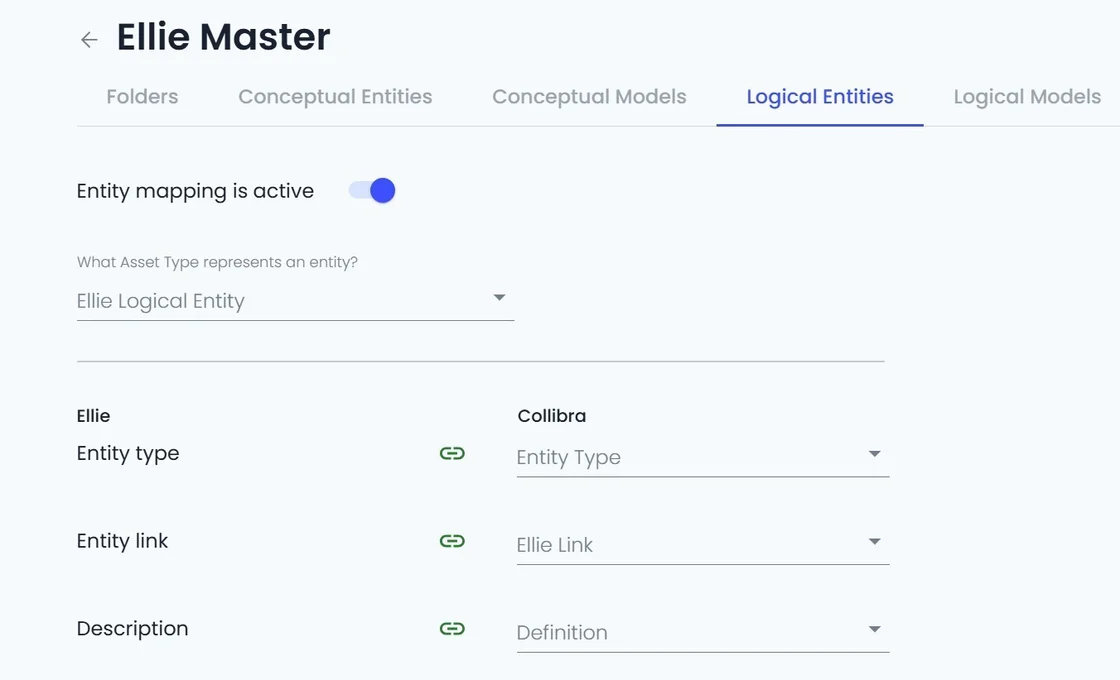
Configurable mappings: Admins can define which Collibra asset types represent Logical Entities, Attributes and Models – offering flexibility to match organizational standards.
Enhanced connector UI: New tabs for Logical Models and Logical Entities make configuration straightforward. Users can also trigger manual sync or rely on automated sync scheduling directly from the interface.
Traceability: Every create, update, and change is logged, ensuring transparency and auditibility across both platforms.
Practical benefit
For users, this means information stays aligned. Changes made in Ellie.AI are reflected in Collibra – and vice versa. Whether adjusting an entity’s attributes or updating a model, the integration ensures both environments stay in sync without manual duplication.
This provides organizations with greater confidence that their data assets are not only governed but also kept consistent and reliable across systems.
Looking ahead
This release elevates the Ellie.AI–Collibra integration by extending it to the Logical layer. Our journey continues as we keep strengthening transparency, lineage, and governance – ensuring that your data assets remain trusted and connected across the enterprise.
👉 For more details and setup instructions, check out the: